
 SK
SK  EN
EN Work/paving-planner
 Live, paid product
 Paving Planner
The paver draws the area in the browser, AI fills in the rest from a photo or sketch, and within minutes the customer has a finished quote with a payment QR. Competitors have not opened Excel yet.
- CAD
- AI
- SaaS
- Platobný QR
- Platby
- 7
- languages and markets
- Stripe
- monthly subscriptions
- 5 min
- instead of an evening of maths
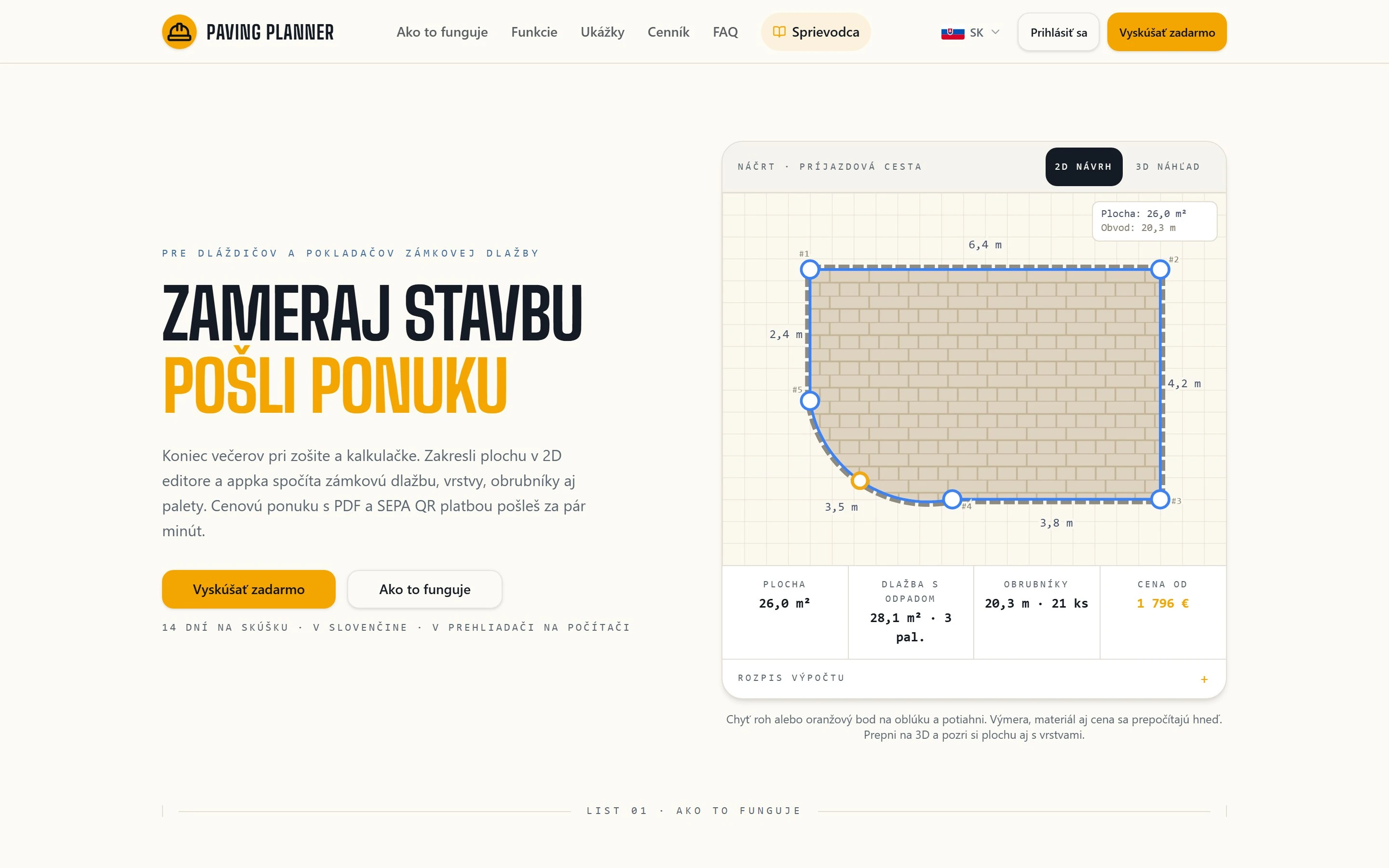
Paving Planner is a paving calculator and quoting tool for paving contractors. It runs live at pavingplanner.com in seven languages on a monthly subscription.
Where the problem was
A paver visits a customer, measures the yard and leaves. In the evening he sits down at home with a notebook and starts working it out. How much paving, how much sub-base, how many kerbs, how much gets cut to waste, how many pallets it comes to.
It takes an hour and the result is a guess. Guess too low and he redoes the job at a loss. Play it safe and quote high, and he does not get the job. And while he is still calculating, a competitor has already sent their quote.
What was needed
Get the calculation out of the evening notebook into something you can trust, and above all get it to the customer fast, while they are still deciding.
The original idea and where it hit a wall
The first idea was simple: let the paver redraw the area in the browser and have the app work out the materials from it. I built a proper engine for that. Geometry that can handle complex shapes with arcs and cutouts, laying patterns including herringbone, cutting waste, kerbs and rounding up to whole pallets.
And then the real bottleneck showed itself. Not the calculation. The redrawing. The paver has a sketch on paper, often straight from the customer, and clicking it in point by point in the editor slowed him down almost as much as calculating by hand.
So out of that came a feature that was never in the original plan: you photograph the sketch with your phone and AI turns it into an editable drawing. The redrawing was out of the way, and only fine-tuning the dimensions was left.
That, for me, is the whole point of the project. The bottleneck was not where anyone expected, and it only surfaced once someone actually started using the thing.
What the app does today
You draw the area, including polygons, arcs and cutouts around trees and manholes, with length and angle locks, so the dimensions hold. Switch to 3D and you see how it will look, including the layers under the paving.
The app works out the materials and shows the calculation step by step, so you see where every number came from. It is not a black box that announces a figure.
The calculation becomes a PDF quote with VAT broken down by rate, rounded to the cent, and a scannable payment QR code, so the customer pays a deposit on the spot, straight from the last page of the quote. You can also share the quote as a link the customer opens on their phone without installing anything.
A company with several people gets its own workspace with roles, so it is clear who is allowed to see what and who is allowed to change prices.
What it brought
An evening guess became a calculation the paver sends to the customer while still on site or on the way home.
The project has since outgrown a single company. Today it is a paid product with monthly Stripe subscriptions, in seven languages and with prices per market. Not translated, but different content and a different tax reality for each market.
Who it is for
Paving contractors and small groundwork firms who quote block paving, driveways, patios and pathways. Anyone who measures a job during the day and then works out the estimate in the evening: how much paving, how much sub-base, how many kerbs, how much gets cut to waste, how many pallets it comes to.
It is estimating software for paving work, not a general construction suite. It does one part of the job and does it properly, and it runs in the browser, so there is nothing to install and nothing to keep updated.
Under the hood
The geometry engine is pure TypeScript with no third-party libraries, twenty-three modules. It computes the area of compound shapes, samples arcs and resolves constraints with conflict handling when two dimensions contradict each other. The herringbone layout uses backtracking, because it cannot be laid out in a single pass.
It runs on Cloudflare Workers, with Supabase holding the data. Stripe covers the full subscription lifecycle including trials and plan changes, and a daily job handles expiries and grace periods. Sketch recognition runs on Gemini with a separate quota for each workspace, so one user cannot use up the limit for everyone else.
Types, lint and tests all have to pass before every commit. There are thirty-nine test files, twenty of them covering the calculations themselves, the part where a bug would cost a client money.
One thing from the build is worth a mention: on large areas about two hundred thousand tiles were being drawn and both the canvas and the 3D view froze. It was fixed by drawing all the tiles in a single pass instead of one by one, merging the 3D geometry into one whole, and properly freeing it from memory once closed.